Free dafont fonts. Every licence verified.
15,575 styles in 4,553 families, free for client work, logos, merchandise and apps. An independent library, not dafont.com — every licence is stated in plain language before you download.
15,575 styles in 4,553 families · OFL, Apache, UFL, MIT, CC0
On most free font sites, the label says free and the readme says personal use only.
That gap is where designers get caught: a logo ships, a shop opens, a campaign runs, and an invoice arrives. DaFontFonts only lists fonts under verified open licences, so there is no personal-use tier to filter out.
How font licences work- Client work, logos, trademarks
- Products for sale, merch, print-on-demand
- Web and app embedding
- Royalties or credit in your design
Browse by style
All 42 categoriesStyles
- Handwriting 472
- Cursive 306
- Calligraphy 71
- Script 470
- Brush 55
- Old English 52
- Gothic 63
- Tattoo 77
- Street 22
- Retro 234
- Vintage 52
- Y2K 25
- Futuristic 111
- Pixel 51
- Western 26
- Medieval 18
- Stencil 16
- Typewriter 14
- Comic 249
- Cute 24
- Bubble 31
- Horror 73
- Grunge 47
- Art Deco 22
- Elegant 32
- Bold 866
- Thin 752
- Outline 36
Use cases
Classification
Seasonal
Text generators
All text toolsUnicode styling for bios, chats and posts. Nothing to install, nothing to license: the output is plain text you can paste anywhere.
Recently added
- Geomini Sans Serif · added 2026-07
- Hibur Mono Monospace · added 2026-07
- Geist Pixel Display · added 2026-06
- Montenegrin Gothic One Serif · added 2026-06
- Yuyu Handwriting · added 2026-06
- Yuyu Short Handwriting · added 2026-06
- Alien Block Display · added 2026-06
- Pliant Sans Serif · added 2026-06
- Akt Sans Serif · added 2026-05
- Arimo Sans Serif · added 2026-05
- Estedad Sans Serif · added 2026-05
- Finlandica Headline Sans Serif · added 2026-05
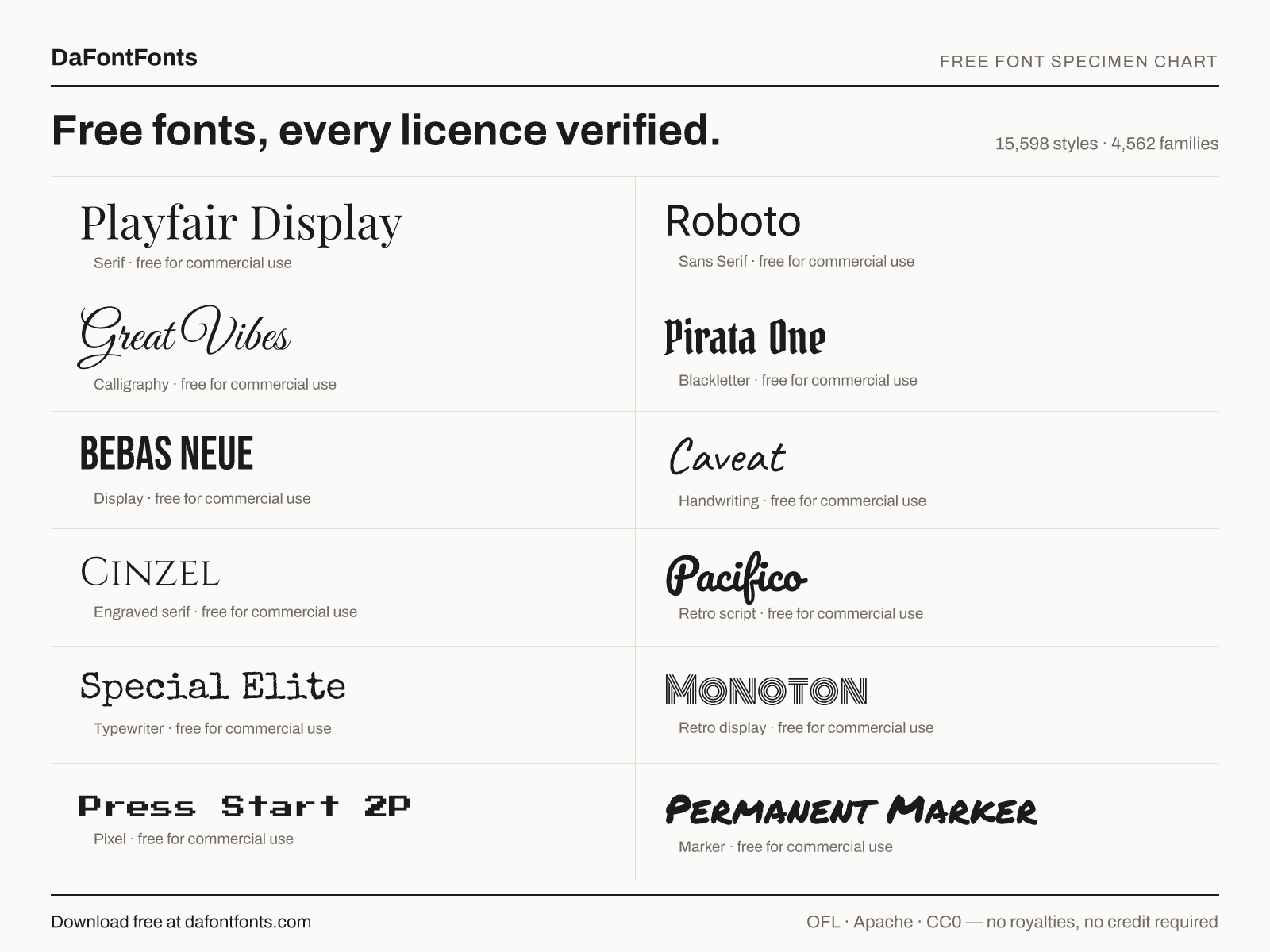
Free dafont fonts, without the personal-use trap
Type dafont fonts into a search box and you are usually after one of two things: a specific typeface you saw on a poster, a tattoo or a title sequence, or simply a large pile of free fonts to scroll through until something clicks. This library does both — 15,575 styles across 4,553 families, previewed live in your own words — with one rule that changes everything downstream. Every family here carries an open licence verified against its authoritative source, so a font you download today cannot turn into an invoice next year.
Worth saying plainly up front: DaFontFonts is an independent project with no connection to dafont.com or any other font archive, and we do not mirror anyone's uploads. What this catalog is, is the licence-checked slice of the free-font world — the part where you never have to open a zip, hunt for a readme, and guess.
Is dafont safe? The question behind the question
Is dafont safe is one of the most-asked font questions on the internet, and the useful answer separates two very different risks. The first is the files. Font files are data, not programs, and installing one from a well-known archive is low-risk; the ordinary advice about avoiding mirror sites, bundled installers and ad-injected “download managers” applies here exactly as it does anywhere else on the web.
The second risk is the one that actually costs people money, and almost nobody checks it. On any large user-upload archive, free is a category, not a licence. A font can sit under a heading that says free and still be licensed for personal use only, which means the moment it lands on a client's logo, a product listing, a t-shirt or an app screen, the designer owes a commercial licence they never bought. The real terms live in a text file inside the zip, and the zip gets opened after the download, if at all.
That gap is the entire reason this site exists. Here the licence is the first thing you see rather than the last: the SIL Open Font License, Apache 2.0, the Ubuntu Font Licence, MIT or CC0, named in plain language on every font page above the download button, with what it permits spelled out — client work, logos and trademarks, merchandise and print-on-demand, web and app embedding, no royalties, no credit required in your artwork. If a licence cannot be verified from an authoritative source, the family does not enter the catalog. That is also why you will not find every novelty face from every archive here, and we would rather say so than pretend otherwise. Personal use versus commercial use goes through the distinction in detail.
A font finder that works on names, shapes and moods
Most people arriving from a dafont font finder search want to identify something they have already seen. Three routes work here. If you know the name, search the catalog directly and you land on the specimen page. If you only know the look, browse by style: cursive, old English and blackletter, tattoo, graffiti, retro, pixel, horror, western, stencil, typewriter and art deco among roughly fifty curated categories. If all you have is a screenshot, our guide on how to identify a font covers the reverse-image tools, the letterform details that give a typeface away, and what to do when the answer turns out to be a commercial release.
That last case comes up constantly, because the fonts people most want to identify tend to be the ones nobody can legally give away. Arial Narrow is the classic: searches for arial narrow on dafont run into the thousands every month, but Arial Narrow is a Monotype typeface bundled with Microsoft Office, not a free download, and any site offering it as one is distributing it without a licence. The practical answer is a metric-compatible or visually close open alternative — Liberation Sans, drawn to Arial's metrics, or Archivo Narrow, Roboto Condensed and Barlow Condensed where you need text to set narrow. Our Arial alternatives page lines them up side by side.
The same logic covers the other perennials. The Stranger Things logo is set in ITC Benguiat, a commercial ITC face, so no free archive can hand it to you legally; the retro and horror categories hold the closest open-licensed serif display work. Starborn and other archive-exclusive novelty faces are absent for the same reason — their terms are not something we can verify, so they do not get listed. Our guide to dafont alternatives compares the archives honestly, including where they beat us.
The styles people actually search for
A handful of categories carry a disproportionate share of every free-font search, and it is always the same handful. Cursive and script sit at the top — wedding invitations, tattoo lettering, logo signatures, Cricut projects — and the cursive category here runs from formal copperplate through loose brush lettering. Dripping and melting display faces come next, pushed along by graffiti, streetwear and horror posters, and they live mostly in the horror and graffiti lists. Old English and blackletter, varsity, Y2K and pixel each own their own corner of the same map.
The useful thing to remember is that a style is where you start, not where you finish. A cursive search returns hundreds of results in any archive; what narrows it down is deciding whether you need something still legible at 11px, something that will photograph well as a tattoo in five years, or something with the swash alternates a wedding suite needs. Each category page notes what the fonts in it are actually good for, and the font pairing guide covers what to set alongside them.
Text generators: the copy-paste half of the job
Sometimes you do not want a font file at all. If the goal is a styled Instagram bio, a Discord name or a TikTok caption, an installed typeface is useless, because those apps render their own. What works there is Unicode: characters that already look bold, cursive, bubbled or glitched, which you paste as ordinary text. That is usually what people mean when they search for a dafont generator, and the generators here cover fancy, cursive, bold, gothic, bubble and glitch styling, each producing output you can copy in one tap.
There is also no dafont app to install, and nothing to install here either. The whole site is static HTML: previews render in your browser, favourites stay in your browser's local storage, no account or email is ever asked for, and no third-party font CDN sees your IP address. It behaves the same on a phone as on a desktop.
How to use this library
Type your own words into the preview bar at the top of the page. A font that looks superb in “Handgloves” can fall apart in your actual headline, your client's surname, or the numeral 8. Shortlist a few families, put them next to each other on the compare page, and star the ones that survive — favourites persist without a login. Then read the licence line before you download, not because it will surprise you here, but because it is a habit worth carrying to every other font site you use. If you want the background first, font licences explained is the place to start, and about DaFontFonts sets out how the catalog is assembled and where the fonts come from.
Dafont fonts: common questions
What is DaFontFonts, and is it the same as dafont.com?
No. DaFontFonts is an independent font library with no connection to dafont.com or any other font archive, and we do not mirror anyone's uploads. The difference is the rule we run on: every one of these 15,575 styles across 4,553 families carries an open licence verified against its authoritative source, so all of them are free for commercial use, not just personal use.
Are these dafont fonts really free for commercial use?
Yes, every single one. The catalog only accepts fonts under the SIL Open Font License, Apache 2.0, the Ubuntu Font Licence, MIT or CC0. All five permit client work, logos, trademarks, merchandise, print-on-demand, and web and app embedding, with no royalties and no credit required in your finished design. The licence and what it permits are printed on every font page above the download button.
Is dafont safe to download fonts from?
Two separate risks are worth separating. Font files are data rather than programs, so the files themselves are usually fine as long as you avoid mirror sites and bundled download-manager installers. The risk that actually costs money is licensing: on any large user-upload archive, free often means free for personal use only, and the real terms sit in a readme inside the zip. That is the gap this site closes by verifying the licence before a font is ever listed.
Do you have a dafont font finder to identify a font?
Three routes work here. Search the catalog by name if you know it, browse by style if you only know the look, or read our guide on how to identify a font, which covers reverse-image tools and the letterform details that give a typeface away. The style route runs through cursive, gothic, tattoo, pixel, retro and around fifty other curated categories.
Where can I download Arial Narrow, and is arial narrow on dafont legitimate?
Arial Narrow is a Monotype typeface bundled with Microsoft Office, not a free font, so any archive offering it as a free download is distributing it without a licence. The safe route is an open alternative: Liberation Sans is drawn to Arial metrics, and Archivo Narrow, Roboto Condensed and Barlow Condensed all set narrow. Our Arial alternatives page compares them side by side.
Do you have the Starborn font from dafont?
No. Starborn is an archive-exclusive novelty face whose terms we cannot verify from an authoritative source, and unverifiable licences do not enter this catalog. If you want that condensed retro-futuristic feel with a licence you can rely on, start with the futuristic and retro categories.
What font does the Stranger Things logo use?
ITC Benguiat, a commercial ITC typeface, so no free archive can hand it to you legally no matter how a listing is labelled. The closest open-licensed work sits in the retro and horror categories, which hold the heavy serif display faces that give the same 1980s paperback look.
Is there a dafont generator for fancy text?
Yes. If you want styled text for an Instagram bio, a Discord name or a TikTok caption, an installed font will not help, because those apps render their own. Our text generators output Unicode characters that already look fancy, cursive, bold, gothic, bubbled or glitched, so you copy the result and paste it as plain text anywhere.
Is there a dafont app I need to install?
Nothing to install. The whole site is static HTML that runs in your browser on phone and desktop alike: previews render locally, favourites are stored in your own browser, and there is no account, sign-up or email collection at any point.
What cursive fonts do you have?
Hundreds of families, from formal copperplate and calligraphic scripts to loose brush lettering and casual handwriting. The cursive category is the place to start, with calligraphy, script, brush and handwriting as neighbouring lists. All of them are commercial-use safe, which matters for wedding suites, logo signatures and Cricut work.
Do you have dripping fonts?
The dripping and melting display look lives mostly in the horror and graffiti categories here: streetwear, poster and Halloween lettering with liquid terminals. As with everything else on the site, each one carries a verified open licence, so a dripping headline can go on merchandise you sell.
How do I choose a font style for a logo or a tattoo?
Preview it in the real words first. Type your own text into the preview bar rather than judging a font on a stock sentence, because a name or a headline exposes spacing problems that Handgloves hides. Then compare your shortlist side by side and check the licence, since tattoos and logos are exactly the commercial uses that personal-use fonts forbid. The logo and tattoo categories are curated for this.
Do I have to credit the font designer?
Not in your artwork. None of the five licences here require attribution in a design, on a product or in an app interface. Some ask that the licence text travel with the font files if you redistribute the font itself, which is a different thing from using it. Every designer is credited on their font page regardless, and the licences page explains the fine print.
Downloading, installing and using the fonts
How do I download fonts from DaFontFonts?
Open any font page and press Download. You get a zip containing the font files plus the licence text, straight from this domain with no wait timer, no redirect and no download manager. Unzip it wherever you like: on Windows right-click the zip and choose Extract All, on macOS double-click it, on iPhone or Android tap the file in Files or your downloads folder. The .ttf or .otf files inside are what you install.
How do I install a font once I have downloaded it?
On Windows, unzip first, then right-click each .ttf or .otf file and choose Install, or Install for all users if the font needs to be visible to every account. On macOS, double-click the file and press Install Font in Font Book. On iPhone or iPad you need a font-installer app such as iFont or AnyFont, which installs the font as a configuration profile you then approve in Settings. On Android, most launchers cannot install system fonts without root, so use an app that supports importing font files directly instead. One rule everywhere: install from the unzipped folder, not from inside the zip, or the font may appear to install and then vanish.
How do I add fonts to Cricut Design Space?
Cricut Design Space does not have an upload box for fonts. It reads whatever fonts are installed on your computer, so the sequence is download, unzip, install to the system, then restart Design Space. After the restart, open a text layer, click the font dropdown and switch the filter from Cricut Fonts to System Fonts, and your new font is listed there alphabetically. That single flow is the answer to every version of this question, whether you searched for downloading, adding, uploading or getting fonts into Cricut.
Why is my new font not showing up in Cricut Design Space?
Four causes account for almost all of it. You installed the font from inside the zip rather than from the unzipped folder, so nothing actually reached the system font folder. You did not fully quit and reopen Design Space, which only reads the font list at startup. You are looking at the Cricut Fonts filter instead of System Fonts. Or you are searching for the file name rather than the font family name, which are often different. Working through those four in order fixes it nearly every time.
How do I use these fonts with Cricut on an iPhone or iPad?
The iOS version of Design Space reads fonts installed on the device itself, so install the font first with a font-manager app such as iFont or AnyFont, approve the configuration profile in Settings, then force-close Design Space and reopen it. Your font appears under System Fonts on the text layer. On Android the picture is less reliable, since custom system fonts generally are not installable without root, so cutting from a desktop is the dependable route there.
How do I add fonts to Google Docs?
Google Docs cannot import a font file at all, so no downloaded .ttf will ever appear in it. What it can do is load any family from the Google Fonts library: open the font dropdown, click More fonts at the top, then search and tick the family you want to add it to your list permanently. This works out well here, because a large share of this catalog is drawn from the Google Fonts open-source collection, so many fonts you preview on this site are available in Docs under exactly the same name. For a family that is not in that library, set the text in a design tool and place it in the document as an image.
How do I add fonts to Google Slides?
Identically to Docs: the font dropdown, then More fonts, then search the Google Fonts library and tick what you want. Slides shares its font list with the rest of Google Workspace, so a family you add in Docs shows up in Slides too. Custom font file uploads are not supported, so for a family outside the Google Fonts library the practical route is to set the headline as an image and insert that on the slide, which also guarantees the layout survives on someone else’s machine.
How do I use a downloaded font in Word, Photoshop, Illustrator or Canva?
Word, Photoshop and Illustrator all read your system font list, so once the font is installed and the application has been restarted, it simply appears in the font menu. Canva works differently because it runs in the browser: use Brand Kit and upload the font file there, which is available on Canva Pro. Every font on this site carries a licence permitting exactly this kind of embedding and commercial use, so there is nothing to check before you ship the file.
Do I need to unzip the file, and what is inside it?
Yes, always unzip before installing. Inside you will find the font files themselves as .ttf or .otf, one per style, plus the full licence text as OFL.txt, LICENSE.txt or similar. Variable font families ship a single file that contains the whole weight range rather than one file per weight. Keep the licence file with your project archive if you plan to redistribute the font itself, though you never need it just to use the font in a design.